Integration guide
CodexBar
CodexBar is a macOS menu-bar app that shows your AI provider usage at a glance. It ships with an official CrossModel provider, so once you add your API key it keeps your wallet balance and today / this-week / this-month spend one click away in the menu bar — no dashboard tab required.
Unlike the other tools here, CodexBar doesn't route your API calls. It's a read-only monitor: it polls two account endpoints and never sees your prompts, completions, or upstream provider keys.
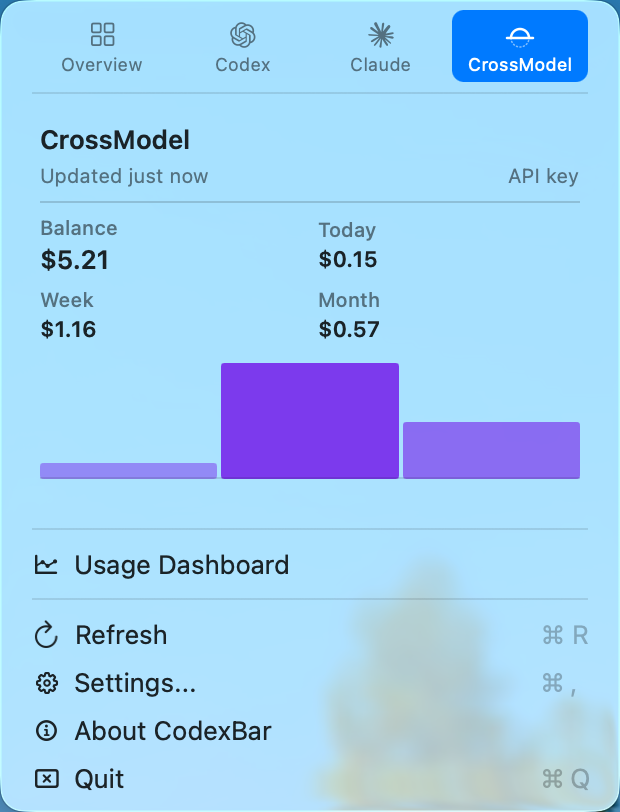
What it shows
- Balance — your prepaid wallet balance, optionally pinned in the menu bar itself.
- Spend — cost for the current UTC day, ISO week, and calendar month.
- Spend chart — day / week / month bars in the inline dashboard.
Quickstart
1. Install CodexBar
Download it from codexbar.app, or via Homebrew:
brew install --cask codexbar2. Create an API key
Sign in to the Console and create a key that starts with cm- on the API Keys page. The key is shown only once, so copy it somewhere safe.
Create a dedicated key for CodexBar. The account endpoints are read-only — this key can watch your balance without being able to spend more than any of your other keys, and you can revoke it independently if a laptop is lost.
3. Add the key to CodexBar
In the app: Settings → Providers → CrossModel, paste your cm- key, and enable Show CrossModel usage.
Or from the command line:
printf '%s' "cm-YOUR_KEY" | codexbar config set-api-key --provider crossmodel --stdinOr export an environment variable before launching:
export CROSSMODEL_API_KEY="cm-YOUR_KEY"That's it — the CrossModel tile now shows your balance and spend.
CLI usage
CodexBar can print the same numbers in your terminal:
codexbar --provider crossmodel
codexbar -p cm   # alias
Environment variables
| Variable | Description |
|---|---|
CROSSMODEL_API_KEY | Your CrossModel API key (required). |
CROSSMODEL_API_URL | Override the base API URL (optional). Defaults to https://api.crossmodel.ai/v1; loopback HTTP is allowed for local testing. |
How it works
CodexBar reads two read-only, API-key-authenticated endpoints:
GET /v1/credits— wallet balance (balance_micro),currency, and any in-flight holds (uncollected_micro). Amounts are integer micro units (1 unit of currency = 1,000,000 micro).GET /v1/usage—currencypluscost_micro,prompt_tokens,completion_tokens,total_tokens, andrequest_countfor the current day, week, and month.
The balance call is required; the usage call is best-effort and won't block the balance if it's slow. Values are cached on our side and may be up to ~60 seconds stale, which is well within CodexBar's polling interval.
Troubleshooting
| Symptom | What to check |
|---|---|
| No balance shown | Confirm the cm- key is set in Settings → Providers → CrossModel (or via CROSSMODEL_API_KEY) and is still active in the Console. |
| Balance shows, spend doesn't | The /usage call is best-effort; give it a moment, or check that CodexBar can reach https://api.crossmodel.ai/v1. |
| Numbers look stale | Usage is cached up to ~60s. Use ⌘R in the menu to force a refresh. |